Welcome to FireChat Pro.
FireChat Pro is developed to provide secure, fast, and modern communication using a unique @Username-based system instead of phone numbers. This Privacy Policy explains how we collect, use, and protect your information when you use the App, whether you download it from the Google Play Store or obtain it through CodeCanyon.
By using FireChat Pro, you agree to the practices described in this Privacy Policy.
1. Information We Collect
1.1. Information You Provide
Username & Profile Information
When you create an account, you choose a unique @Username, and optionally upload a profile photo and display name.
Chat Content
Messages, images, videos, voice notes, and other media you send or receive are end-to-end encrypted, meaning we cannot read or access them.
Stories / Status Updates
Text, images, and videos you share in your Stories are stored securely and visible only to users you choose.
1.2. Automatically Collected Information
Device Information
Device model, operating system version, app version, and unique device identifiers (for debugging and performance monitoring).
Usage Data
Basic analytics such as feature usage, crash logs, and interactions within the app.
Connection Information
IP address, network type, and timestamps of activity (not chat content).
2. How We Use Your Information
We use collected information for purposes such as:
- Creating and managing your account
- Enabling messaging, calls, and media sharing
- Improving app performance and user experience
- Maintaining security and preventing misuse
- Providing customer support
- Complying with legal requirements
3. End-to-End Encryption
FireChat Pro uses end-to-end encryption for all chat messages, voice calls, and video calls. This means:
- Your communication is encrypted on your device
- Only the intended recipient can decrypt and read/view it
- We cannot access or store your messages, calls, or media
4. How We Store & Protect Your Data
- All sensitive data is encrypted in transit and at rest
- Servers follow strong industry-standard security practices
- Chat content is never stored unencrypted
- We do not sell, rent, or share personal data with third parties
5. Third-Party Services
FireChat Pro may use trusted third-party services for:
- Push notifications
- Analytics
- Cloud storage or real-time database functionality
These third-party providers comply with their own privacy policies and industry standards.
6. Data Sharing and Disclosure
We do not share your personal information except:
- With your consent
- To comply with legal obligations
- To prevent fraud, abuse, or security threats
- To operate required app services (e.g., cloud infrastructure)
We never sell your information.
7. Your Rights
Depending on your region, you may have the right to:
- Access your account information
- Delete your account
- Request correction of inaccurate data
- Request deletion of stored data
- Withdraw consent where applicable
To exercise these rights, contact us at the email below.
8. Children’s Privacy
FireChat Pro is not intended for children under 13, and we do not knowingly collect information from children.
9. App Distribution on CodeCanyon
If you purchase the source code from CodeCanyon:
- No personal information is collected from you during the purchase
- Your usage of the App (once deployed) is subject to this same Privacy Policy
- We do not access or collect buyer information from CodeCanyon
10. Changes to This Privacy Policy
We may update this Privacy Policy from time to time. We will notify users by updating the “Last updated” date or through in-app alerts.
11. Contact Us
If you have any questions or requests regarding this Privacy Policy, please contact:
Email:
jejookit@gmail.com
Developer/Company Name:
Jejookit
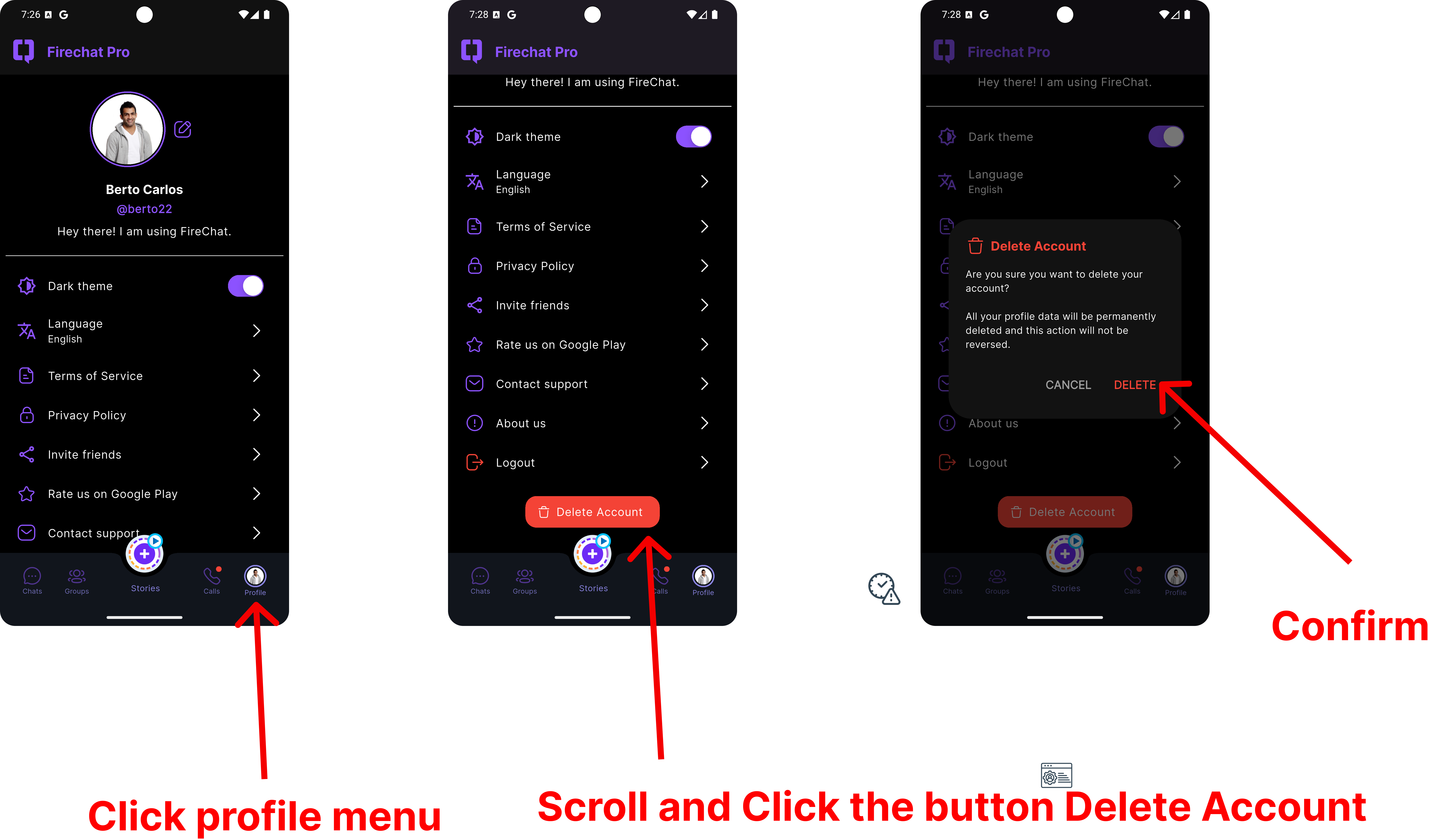
12. Account Deletion Information
How to Delete Your Account
There is already an option to delete your account directly in the app, so you do not need to contact the admin. Please follow the steps below:
- Open the Profile menu: Tap the Profile icon in the bottom navigation bar.
- Scroll and tap “Delete Account”: At the bottom of the screen, tap the Delete Account button.
- Confirm deletion: In the confirmation dialog, tap DELETE to permanently delete your account and profile data. This action cannot be reversed.